Posts

hardware raid vs software raid

A raid is considered hardware based when it is implemented in hardware. In software raid it just uses software instead of hardware. There are many difference between hardware and software raid. Describe below hardware raid vs software raid: 1. Cost : To implement hardware raid we need hardware disk but in software raid we just use software. So we can say that hardware raid costly than software raid. 2. Complexity : Software raid is a part of OS and it works on partition level. Sometimes software raid increases complexity but the complexity level of a hardware raid is low. 3. Performance : The performance of hardware raid always high but in software raid it depends upon use of the software. 4. Throughput :  Hardware Raid offers higher throughput but software raid do not offers higher throughput. 5. Faster rebuilds :  If any system failure occurs hardware raid recover it easily but it is not easy to rebuild software raid system. To improve this content plz make your comment.

Different raid level in database

Image
The word RAID means Redundant Arrays of Independent/Inexpensive Disks. In many web application, database application we need to store big data. To store this data we need many hardware disk. Large number of disks helps you to read or write data item in very short time. There are many kinds of RAID or hardware disks. Each disks has special characteristics. Some disks reliable but not good in performance. Here I explain different raid levels in database : RAID level 0 : Raid level 0 is non redundant disk array. That means in the disk of raid 0 has no extra/redundant information. Raid 0 offers best performance because it never needs to update redundant data. In raid 0 if either disk fails, all data is lost. The data is divided into block and distributed across drives in array. Two disk used most often, half data on each disk. Non redundant disk arrays are widely used in super computing environment. To understand raid level 0 see this image below: Raid level 1 : Raid level 1 is called...

Solving Potentially dangerous Request.Form with custom attribute in MVC3

Image
If you punch in “<” character while filling a MVC web form (or even ASP.NET) and press submit, you’ll encounter a System.Web.HttpRequestValidationException exception. I.e., results in: Upon search, you’ll find few common options to resolve this. I've tried to consolidate them and also have added an interesting approach at end which I find very useful for handling this issue: Option-1: Disabling RequestValidation through Web.Config Adding following tag in Web.Config: Pros : Easiest to do!! Cons : Skips validation throughout application. As a good rule, Validation should be explicitly bypassed but by setting this option, we are implicitly bypassing validation which is not good. Option-2: ValidateInput attribute Another option that resolves this problem is using ValidationInput = false attribute on Controller. For example: [ValidateInput(false)] [HttpPost] public ActionResult Index(MyViewModel vModel) { return View(); } Pros: Easy to use and can be applied only on s...

Implementation of Locking in database

Image
A lock manager used to maintain lock request and lock response. The lock manager reply message when lock grant or not grant. Lock manager reply two kind of message such as a transaction locked message and  unlocked message. The lock manager maintains a data structure called a lock table to record granted locks and pending requests. In this data structure the data item maintains a linked list of records. Each record of the linked list for a data item notes which transaction made the request, what lock mode it requested. The lock table uses hash table indexed on the name of the data item being locked. This picture shows an example of a lock table. This table contains locks for five different data items 14, 17, 123, 144, and 1912. Black rectangles indicate granted locks, white ones indicate waiting requests. The lock manager processes requests in two way first one is lock request and second one is unlock request: 1. Lock request: When first lock request message arrives, the lock mana...

Two-Phase Locking Protocol

Image
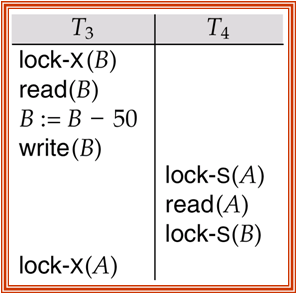
To maintain serializability we use two-phase locking protocol in database transaction . Specially we use the following two protocol for data locking purpose. We divide locking protocol into two phase. First phase acquire locks and second phase release the locks. Given below the two-phase locking protocol. 1. Growing phase: A transaction firstly acquired locks, but may not release any lock.   2. Shrinking phase:   A transaction may release locks, but at the time not taking any new locks. Initially, in the growing phase a transaction acquires locks as needed. Once the transaction start to release locks, it enters the shrinking phase. Now consider this transaction lock-S(A); read(A); lock-S(B); read(B); display(A+B); unlock(A); unlock(B); In the above transaction at first it acquire locks serially and then it releases the locks. This transaction follow two phase locking protocol.Two-Phase locking protocol ensures conflict serializability . But unfortunately lockin...

Replacing OuterHTML with AJAXHelper.ActionLink

There are various wayswhich provides unobtrusive way of updating UI with response from server via AJAX. One such option provided by MVC framework is Ajax.ActionLink. For example, @Ajax.ActionLink ( "TextOfLink", "ActionName", "ControllerName", new AjaxOptions() { UpdateTargetId = "DivToBeReplaced"} ) Above code generates a link which when clicked, calls an action called “ActionName” of the controller “ControllerName” and what ever is returned from this action, is displayed in a div with id “DivToBeReplaced”. That’s so easy!But there is a minor caveat in using UpdateTargetID . By default, it replaces the contents of div and not the div itself. Which means in following Razor code, <div id="mydiv"> Some Text @Ajax.ActionLink( "Refresh", "Index", new AjaxOptions(){UpdateTargetId = "myDiv"} <div> Clicking on generated action link would r...

Understand database lock concept

Image
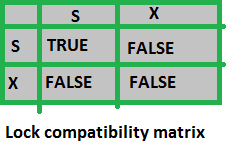
Database lock concept use when many user want to concurrently access in the database such as oracle database. When many user want to write the same data at a time, the data must be destroyed. To handle this problem we use locks. The data can be locked in two modes 1. Shared(S) mode: The data item can only be read. S lock is requested using lock-S instruction. 2. Exclusive(X) mode: The data item can be both read as well as written. X-lock is requested using lock-X instruction. The concurrency control manager handle the lock request. If you want to lock any data item, at first you need to make a request to the concurrency control manager. The concurrency control manager check it and give you the response is the transaction grant or not. When you lock a data item in share mode, another share mode can be able to lock it but when you lock it in Exclusive mode, another mode cannot lock the data at this time. To handle this compatibility database control manager use lock-compatibility ma...