Posts
JQuery unrecognized expression in parsing MVC Partial
This is a quick tip sharing. Recently, I was stuck in a problem where I was making an AJAX call to get MVC partial as HTML in response. Within this response, I made an attempt to find an element using $.find as following: $.ajax({ url: theURL, type: "POST", success: function (data) { var controls = $(data).find('#someTextBox'); } }); .find threw an exception: Uncaught Error: Syntax error, unrecognized expression: <HTML response> Issue was with enter keys and spaces in the response. Trimming data before calling find, resolved the issue. var controls = $(data.trim()).find('#someTextBox');
How to write JavaScript in MVC style
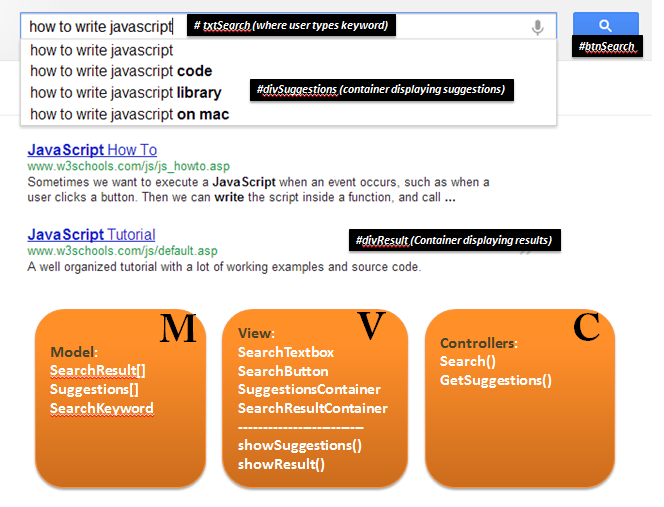
Intent ============================================================================== This tutorial explains a way to implement MVC (Model View Controller) pattern in client script using pure JavaScript . Idea is to highlight basic fundamentals of implementing MVC in client code. If you grab these basics, you can easily create advance implementations with lesser code using various libraries like JQuery and Knockout etc. Quick brush up on MVC Instead of getting theoretical, I'll put it this way: View : These are the HTML elements in your UI - TextBoxes, HiddenBoxes, Images, Tables etc. For example, in Google home page, view elements includes Search TextBox, Search Button, Search result div container, Suggestions display div container etc. Model : Model represents data which drives functionality of screen. It may or may not have 1:1 mapping with your view elements. For example, in Google search page, model may contain an array of autoSuggest words or an array of search results...
How to write JavaScript functions in different styles
INTENT ================================================================= This article is to explore different ways to write JavaScript functions. All example below are in context of plain JavaScript and do not depend on any library like JQuery (which might come as a surprise to few :) Level: Beginners Original Basic implementation.. Declare a method and call at some point later function SayHello(msg) { alert(msg); } //call explicitly SayHello('my name is'); //alerts "my name is" Different style where function is assigned to a variable and then called later var SayHello = function(name) { alert(name); }; SayHello('Deepak'); NOTE: Check the ; at end of function (i.e. after }) . This was not required in previous example because we declared a method. However, now we are assigning a function to a variable just like we say var i = 10; If you miss this ';', function would still execute properly but many IDE's may complain th...