Posts

Showing posts with the label drupal

Top 5 E-Commerce Themes For Drupal
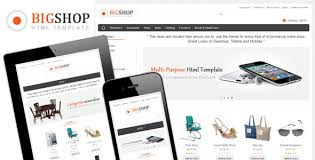
Image
Drupal is a stable and robust e-commerce platform that is extensively used to run shopping portals. Coupled with the fact that Drupal is also open source and easily available, it is one of the most used platforms along with WordPress, Joomla and Magento. You can easily get extensive range of e-commerce themes for Drupal and make the most of them for your business. 1. BigShop : Developed by TabVN, BigShop is a responsive Drupal theme that can be used to run a sturdy and attractive e-commerce platform. BigShop uses Drupal Commerce module along with API payment method add-to-wishlist, Tax calculation support, product rating etc. 2. Spotlight : The theme is compatible with the latest Drupal version 7. Developers can use the theme to design portrait or landscape designs mainly for the mobile version using the Spotlight theme. 3. Retail Shop :  To add freshness and clarity to designs, Retail Shop is a good theme for Drupal e-commerce. Created by ThemeSnap, Retail Shop supports importa...

Block Visibility Conditions in Drupal

Image
While dealing with “Block” in Drupal, you have many choice regarding its display. Like, in simple words where to display,for which conditions,for which users,for which roles.etc..  So, in this post you will learn about such useful conditions.We called it as “Block Visibility Conditions”. General Way of providing block permissions If your block was created from a view (if not then you can create one) ,then the access settings can be set in the view edit mode: Now you can simply select the permissions to access the block.Users having the selected permission will be able to access this display. Click on the little 'cog-wheel' to the right of the 'Access' row under the view's basic settings in order to select the restriction you desire:  Attention :  Please see the comment below the 'Default Access Options' list as shown in the above image. If you want to remove 'access all views' for the anonymous user,you can do it from  '/admin/user/permissions...

7 Modules- Making your Drupal website responsive and more mobile friendly

Here we will discuss about the seven modules that plays an important responsibility in creating your Drupal 7 website more responsive and more mobile friendly. It is now become very important to cope with the size of the handheld devices used by the people to cater their needs. Adaptive Image: Adaptive Image is a very helpful module that manages your site image field considering the appropriate device version. Here you are just required to enhance the adaptive outcome for image style plus specify some breakpoints. Picture: The picture is a back-port of the Drupal 8 Picture module. Basing on the device competences it helps in delivering alternative image sources by using HTML5 picture element. This will avoid the act of downloading large images. Retina Images: Retina Images are the last module related to image. It uses high pixel density displays which make your images crappier than normal displays even if the image resolution is not good. Retina Images resolve this problem by offering...

Tips for New Drupal Developers

Image
   (1) Basic URL Structure for Drupal Content After you have completed your drupal installation, in next step you are supposed to  create new content.For that navigate directly to this URL (where yoursite.com is your domain name): http:// yoursite.com/node/add Content within a Drupal site are called nodes. A node may be an image, a page, a story, an announcement, a poll, a web form, or a job listing — In general you can consider node as a single unit of content. For example, if you want to create a new page, you can go to the following URL: http://yoursite.com/node/add/page Once you create content, you can find its nid (node ID), its a unique identifier for that node, in the URL. You can easily determine the nid through the URL,see the following url , where [nid] is the node ID of that page: http:// yoursite.com/node/[nid] (2) Setting Up Basic Site Information Some standard information gets collected and displayed on your basic Drupal setup, such as the name of the web...

How to Add Google Maps to Drupal Content

Image
Hi Friends , In this post I am going to explain how to add Google Maps to Drupal Content. To accomplish this , following modules will be needed. Addressfield :  A Drupal 7 field module to hold postal addresses, implementing a subset of the fields defined in the xNAL standard. Addressfield_staticmap : This module can generate either of the 3 following as a block when placed on a content type that has an address field:                    1) Google static map                    2) Regular JS Google map that defaults to the static map if Javascript is disabled.                    3) Mapquest static map Download links are given below.         • http://drupal.org/project/addressfield ...

How to Install Drupal on Windows localhost with WampServer

Image
1) Here,  I am assuming  that you have Installed WAMP already, if not, then proceed to wampserver.com and download the latest version. After the installation, launch it, type http://127.0.0.1 on your browser, and make sure you see the default screen. 2) Download Drupal - I'm using the v7.14 .zip version. Unzip into a dir at: C:\wamp\www, for example: C:\wamp\www\drupal - where drupal is the main directory containing all the drupal files. 3) Create a database in WAMP using PHPMyadmin. You should have the following info ready:database name, username and password. 4) To begin installation, type: http://127.0.0.1/drupal. You should see a page displayed similar to the below. By the time we finish, all the processes at the left hand side must have a green-check mark.      (a) Leave "standard" Radio button checked, click "save and continue".       (b) Choose Language: "English" (built-in) is selected. Leave as is, click "Save and Continue...

Drupal Introduction

Image
In this post you will learn basic introduction of the Drupal. Some of its Features and about the choice to select it. Drupal is a free software package that allows you to manage , organize  and publish your content, with variety of customization. Drupal is developed  and  maintained  by a community having 625,000+ users and developers. It's distributed under the terms of the GNU General Public License  , it means you are free to download it and share it with others. Why is Drupal "the better choice" ? All the Content Management Systems (CMS) have forum and blog capabilities. They often have different modules by using which you can extend the system capabilities. Drupal has vibrant community like no other CMS system. It's a point that makes Drupal very concurrent on the Content Management System’s market.It also has some unique features that make it very different and much more powerful then the most of other comparing software products.  Some of those featu...