Posts

Showing posts with the label PHP Basic

PHP increment and decrement operators

In PHP the ++ and the -- sign are increment and decrement operators. Increment means increase and decrement means decrease that means increment operator increase the variable value and decrement operator decrease the variable value. The PHP increment operator increases it's variable value by one and the PHP decrement operator decreases it's variable value by one . Suppose that we have a variable $x. We want to increase it's value one. Consider the statement below  $x=10 but we want to increase it's value one so that the new form is  $x=$x+1 We can rewrite this by using PHP increment operator :  $x++; Similarly in PHP decrement operator we can write $x--;  Each PHP increment and decrement operators has two types:  (++$x) Pre-increment : It first increment $x value one and then return the value of $X. ($x++) Post-increment : It first return $x value and then increment the value of $x. (--$x) Pre-decrement : It first decrement $x value one and then return the val...

PHP comparison operators

PHP comparison operator means using PHP operators compare two things or two variable . Suppose that we have two variable $a=10 and $b=20. We have to know which variable is small or big. In that case we use comparison operators. Different types of PHP comparison operators are given below ( == ) Equal : It returns true if $a and $b is same.  ( != ) Not Equal : It returns true if $a and $b is not same.  ( === ) Identical : It returns true when $a and $b is same and same type.  ( !== ) Not Identical : It returns true when $a and $b is not same and same type. ( < ) Less than : Returns true if ($a<$b) $a is less than $b.  ( > ) Greater than : Returns true if ($a<$b) $a is greater than $b.   PHP comparison operators first check the condition then return true or false. If true then execute the program otherwise not execute the program. Now take a look at the example below <pre class=”brush: php;”> <? php $a = 10 ; $b = 20 ; $c = 10 ; echo ( $a ==...

PHP assignment operators

PHP assignment operators are used to assign value in a variable such that we can assign value 10 in a variable $a like that $a=10. Now the value of $a is 10 because we assign 10 in variable a. equal (=) sign is used to represent PHP assignment operator but in array we use => sign to assign value. Now take a look at an example of PHP assignment operators. <?php $a = 20; echo $a; ?> Save and run the above code. We can use PHP arithmetic operator in PHP assignment operator. Here is an example: <?php $a=10; $a+=10; echo $a; ?>

PHP arithmetic operators

When you were start your first math learning, I am sure you have used + sign, - sign, * and / sign. These sign are used in PHP as a arithmetic operator. Different kinds of PHP arithmetic operators are + operator, - operator, * multiply operator, / division operator, % modulus operator. Here we describe its clearly. (+) Addition Operator: Using this operator we can add two value such that $a + $b or 12+15=27. (-) Subtraction Operator: Using this operator we can subtract two value such that $a - $b. (*) Multiply Operator: We call * sign is multiply operator in PHP. Multiply operator is used for multiplication such that 12*2=24. (/) Division Operator: To find quotient we use PHP division operator. For an example, 12/2=6. (%) Modulus Operator: We find remainder from two variable we use PHP modulus operator. For an example, 12%2=0. PHP Arithmetic Operator Example:   Let's try an example where we have used all PHP arithmetic operators. <?php echo (2+8); // Addition echo "...

PHP Operators Index

PHP operators are used to compare two values. It is an expression that takes one or more values and produce another value such that $a+$b where + sign is an operator and a, b are two variable. PHP operators are two types:  Unary Operator and Binary Operator Unary Operator: Unary means one. PHP unary operator can take only one value, for an example ++,-- operator. We use ++ operator to increment value and -- operator to decrement value.  Binary Operator: Binary operator can take two value such that + operator, - operator etc. For an example, $a+$b. Some PHP operators are plus + operator, minus - operator, * multiply operator, / divide operator and so on. We can divide all PHP operators into different types. Before entering the dept of our PHP tutorial we need to understand each operator clearly. Here is the lists of all PHP operator. PHP Operators Index: Arithmetic Operators Assignment Operators Comparison Operators Bitwise Operators Incrementing Operators Decrementing Oper...

PHP do-while loop

In the PHP while loop if the initial condition is false then it will not execute the inner code but in real life application sometimes we need to execute the inner code at least one time even the condition is false. To do this PHP provides do-while loop . So the general form of PHP do-while loop is do{  //The body    }while(condition); In each time the do-while loop first executes the body of the loop and then evaluates the condition. If the condition returns true then the loop will repeat otherwise the loop terminates. PHP do-while example Now take a look at an example based on PHP do-while condition. <?php $value=1; do {     echo $value;     $value++;     }while(!$value==1); ?>  In this code snippet at first it prints the value 1 though the condition is not true. After printing 1 then it checks the while condition. Now the while condition is false so that the loop will be terminated. Consider another example where...

PHP while loop

PHP while is an iterative loop by which we can repeat a condition based on condition. The general form of PHP while loop is while(condition) { executed satement } PHP while loop starts with the name while and then condition. If the condition is true then it allows to execute the statement otherwise it terminates the while loop. So we can say that the condition part returns true or false. PHP while loop example Now we try to do a problem using php while loop. The problem is to add 1,2,3,4,5,6,7,8,9 and 10. So the code is <?php $value=1; $sum=0; while($value<=10) {     $sum=$sum+$value;     $value++;     }     echo $sum; ?> If the while condition is not true then the PHP while loop will not execute the inner code. Here is an example. <?php $value=1; $sum=0; while(!$value==1) {     $sum=$sum+$value;     $value++;     }     echo $sum; ?>

PHP foreach statement

PHP foreach statement works on PHP array by which we can reach every elements of an array. For example, we have an array like $array(10,20,30,40), we want to print each element of that array. In this kind of case that means in PHP array we use PHP foreach statement. Now take a look at the structure of PHP foreach statement. foreach($array as $value) { code to be executed; } In the foreach statement at first we use the actual array and then we use a temporary variable which is used to store the array elements. foreach statement example Now I am trying to provide an example. Think that we have an array that contains number 1,2,3,4,5 . So now try to print each array value using PHP. <?php $number=array(1,2,3,4,5); foreach($number as $value ) {     echo $value;     } ?> In the above code we just print the each value of this array. Now we try to print something based on condition. So now take a look at the example. <?php $number=array(1,2,3,4,5); foreac...

PHP continue statement

PHP continue statement and break statement are identical but the only difference is PHP continue statement just skip the current iteration and continue execute other iteration inside loop. We can use continue statement in PHP iteration statement such as for loop, while loop and do-while loop.  We can define PHP continue statement by using if statement such as if(condition) continue;   If the condition is true then the continue statement is executed.  Now we consider an example to understand the PHP continue statement. PHP continue statement example: <?php for($count=0; $count<=10; $count++) { if($count==5) continue; echo $count; } In this example after if condition we use continue statement. So this program not print 5 because for continue statement. The output look like this where 5 is missing 1234678910

PHP break statement

We use two jump statement in PHP such as break statement and continue statement. Break means stop. So PHP break statement stop the program execution based upon condition. We use PHP break and continue statement to control the loop or program flow. PHP break and continue statement is totally different from each others. If we found PHP break statement inside a loop then the loop will stop the execution and the loop will be terminated. So we can say that if PHP break statement is available in the loop then the loop won't work by comparing specific condition. In the condition part we use if statement and then we set break statement. PHP break statement Structure: if(condition) break; In this code at first we use a condition, if the condition is true then the break statement is executed and it terminate or jump the program. PHP break statement example:  Now consider an example using PHP. In this example we use for loop but you can use break statement in any kind of loop ...

PHP control statements

We need to control PHP code based upon different condition for example, if the user click on the registration button, then a registration form will show to the users. To control the PHP code we use different types of PHP control statement such as if, else, for loop, break etc. PHP control statement has been broken into three types of category.  PHP selection statement PHP iteration statement PHP jump statement From those statements, using PHP selection statement we can easily select different types of PHP code based upon condition. We can divide the PHP selection statement into two parts  PHP if statement  PHP switch statement  Using PHP iteration statement we can repeat PHP code based upon condition. We can divide PHP iteration statement into three types PHP for loop PHP while loop  PHP do-while loop  Using PHP jump statement we can break PHP condition and we can jump one code snippet to another code snippet. PHP jump statements are two types PHP break sta...

ZAMPP installation

Image
In our previous tutorial we saw how to install Vertrigo web server , today I will describe how to install XAMPP web server in your local computer. XAMPP is a very powerful software that provides integrated PHP environment. To create PHP environment we need Apache, PHP, MySQL but XAMPP consolidate those three things. So follow the following steps to install ZAMPP in your computer as a server.   ZAMPP Installation Procedure I divided the installation procedure into three steps. Step 1:  We can install ZAMPP in two ways, one is manually and second one is through installer. In this section we try to install XAMPP manually. To do this, at first you need to download ZAMPP from ZAMPP DOWNLOAD . Step 2:  After downloading the file, extract the downloaded file. After extracting the file you need to choose where you want to install XAMPP such that I want to install ZAMPP in D folder. So put your extracted file in D folder. Double click on Setup_xampp.bat. Now click on xampp-contr...

Vertrigo server installation

Image
Before installing Vertrigo server we try to know something about Vertrigo web server. Vertrigo is a software system that provides PHP environment with one step installation. This integrated software provides Apache, PHP, MySQL and PhpMyAdmin in integrated way. If you install vertrigo web server in your computer then it will creates PHP environment in your computer as a local server. So let's try to install vertrigo web server with us.  Vertrigo Server Installation Procedure: Step 1: First of all download the latest version of vertrigo web server from this link Download Vertrigo . To download the latest version click on GET THE LATEST VERSION . Step 2:  After download, double click on that file and then click next, then click on I agree. Then select the destination folder such that I select D folder like the picture. Step 3:   Install the software by clicking next. Your work is done. You will see a Vertrigo server icon in your desktop. Double click on this icon and the s...

PHP installation

We know PHP run on server, that's why at first we need to create PHP environment in our local computer. To do this we need to install PHP and a web server. So we say that to create PHP environment we need two things  PHP (Apache) Web Server   At first we install PHP (Apache) and then we install web server. This installation process is very complex. Now a days there are various types of software provides integrated capability, that means we need to install only one software to create PHP environment. Some software are XAMPP, WAMPP, Vertrigo etc.   In our tutorial we will show you how to install XAMPP and Vertrigo in your local computer. I like vertrigo web server and though in our whole tutorial I will use Vertrigo web sever but you can use XAMPP server. XAMPP server is very useful and popular web server for the PHP developers. So guys install one software among them ( ZAMPP or Vertrigo). If you already installed PHP environment just skip this installation process. X...

PHP assignment operator

PHP assignment operator used to assign value in the variable such that we assign 10 in the variable x and we write x=10. So we can use equal to sign to assign the value. In PHP array we use => sign to assign value.

All About PHP array

We know what is PHP variable. In a variable we can store information. But PHP variable has some problem such as in a variable we cannot store same types of information. Variable takes same types of information as a one information. But we need to store our information separately.   For an example, we want to store different name in a variable and the code is  <?php $variable="Sharif","Rahim", "Zohn";  echo $variable; ?> This code show "Sharif","Rahim", "Zohn" but we want to show only Rahim or Zohn. That is the problem. To solve this problem we introduce PHP array. Array store same type of information and we can retrieve information separately from an array variable. To understand array we write a PHP code here. Suppose that we want to store some customers name in a variable. Take a look at the code  <?php $customers=array(“Sharif”,”Rahim”,”Karim”,”Shuvo”); echo $array[1]; ?>  

PHP for loop

PHP for loop executes repeatedly same set of instructions until a termination condition is met. Sometimes we need to work with same types of code hundred to thousands time. In that case we need to write same type of code thousands time. It is a problem. To solve this problem PHP introduce for loop where we set just upper and lower condition. PHP for loop structure:  Here is the general form of the for statement for(initialization; condition; iteration) { // Body } The for loop operates as follows:  Initialization: PHP for loop starts with initialization and initialization parts is only executed one time. Condition: It returns true or false. Condition part test the loop. If it returns true then the body of the loop is executed otherwise it exits from the loop. Iteration: It increment or decrement the counter value ( We a assume counter value which control the loop ). First the loop test the condition and then execute the body and then execute the iteration and it repeats unt...

PHP variable

Image
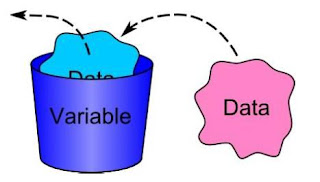
PHP variable is nothing but a container. In that container we store data. So we can say that PHP variable is a container that store information. Take a look at the picture to understand the PHP variable. PHP variable naming convention:  Each variable has a name. To write variable name we need to follow some rules such as PHP variables start with $ sign. A variable can constitute with letter, number, underscore or dash sign. PHP variable is case sensitive. Here I give some PHP variable examples. $var, $Var, $myVariable, $this_variable, $product, $_book, $__book, $this-variable All of the above rule is right but in PHP we cannot write $this-variable, $_book, $__book  type of variable. Now we try to write a variable example with PHP code. <?php $var=10; echo $var; ?> Save this code with any name and run. This will show 10. If you write same variable many times  in PHP code segment, PHP just count the last variable information such as <?php $var=10; $var=50; $var=100...

PHP switch statement

PHP switch statement is a better alternative than a large series of if-else-if statements. It can switch in different part of the code based on condition. Here is the general form of a PHP switch statement.     switch(expression){ case value1 executed statement; break; case value2 executed statement; break; ……………… default: // default statement } In the PHP switch statement duplicate case values are not allowed. The expression value checks every case iteratively if a match is found then the following case statement is executed. If none of the cases does not matches the value of the expression, then the default statement is executed.

PHP if statement

We use PHP if statement to control the PHP program flow based upon conditions. It is used to route program execution. Here is the general form of if statement. if(condition) Statement; Under the if statement the condition part returns a boolean value. If the condition is true then the statement is executed. It is a single statement but if the statement is complex we must enclosed the statement or block of code with curly braces otherwise the second statement is executed (if the condition is true or not). Here’s the form is if(condition) { Statement1; Statement2; ……………….. } Now we try to solve a problem with PHP if statement. Here, if Rahim‘s age is greater than 20, then it print Rahim is old boy. <?php $age=50; If($age>20) echo ” Rahim is old boy”; ?>